
Imagine having a brilliant engineer sitting next to you who never sleeps, never complains, and will happily rewrite an entire codebase at two in the morning. That’s the promise of Claude Code. And yet, most people who try it walk away unimpressed, not because the tool is weak, but because they’re using it the way you’d use a calculator when what you actually have is a supercomputer.
The difference between someone who gets mediocre results and someone who gets extraordinary ones comes down to one thing: understanding what Claude Code actually is, and building a workflow that treats it accordingly. This guide will walk you through everything, from the fundamentals to the power features that most users never discover.
What Is Claude Code?
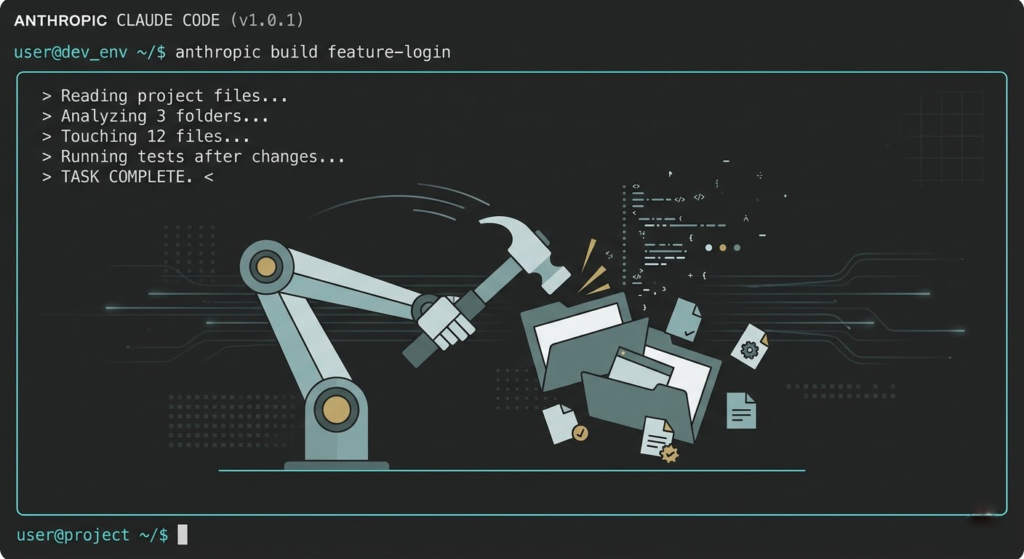
Claude Code is not a chatbot with a code syntax highlighter, but rather an agentic command-line tool built by Anthropic that operates directly inside your development environment. A regular AI assistant sits behind a chat window and hands you text to copy, so you always end up doing the manual work yourself. Claude Code, however, is wired into your file system, and because of that it reads your project files, writes and edits code, runs commands, navigates directories, and executes multi-step tasks, all without you having to paste anything anywhere.
Think of the difference this way: ChatGPT tells you how to build a house. Claude Code picks up a hammer.
« The moment it clicked for me was when I described a feature and Claude Code spent twenty minutes autonomously touching twelve files across three folders, running tests after each change. I didn’t write a single line. »
It’s built on Claude, Anthropic’s frontier AI model, which means it brings serious reasoning capabilities to every task. But the architecture of Claude Code transforms those capabilities into genuine agency. It doesn’t just generate code; it understands context, maintains awareness across your entire project, and can execute long, multi-step plans end-to-end.
How It Works Under the Hood
You launch Claude Code from your terminal. From that point onward, it has access to your working directory, your files, your project structure, and your configuration. When you assign it a task, it doesn’t simply respond with text. Instead, it reasons through the problem, determines which files it needs to read, makes the necessary changes, and can even run shell commands to verify the results.
Moreover, the key operating modes are what make it genuinely powerful. By default, Claude Code asks for your confirmation before taking consequential actions. However, when you switch it into auto-accept mode, it can operate autonomously, working through a plan from start to finish while you focus on something else.
This is also where the Model Context Protocol (MCP) comes in, a feature we will cover shortly. At its core, Claude Code can connect to external services and data sources, which significantly expands what it can execute without requiring your direct involvement.
As a result, the architecture rewards preparation. The more context you provide upfront, about your project, your conventions, and your goals, the fewer corrections you will need to make later. Consequently, less steering during the task leads to faster and cleaner output. This ultimately brings us to the most important lesson in this guide.
The Optimal Workflow: Plan First, Execute Second
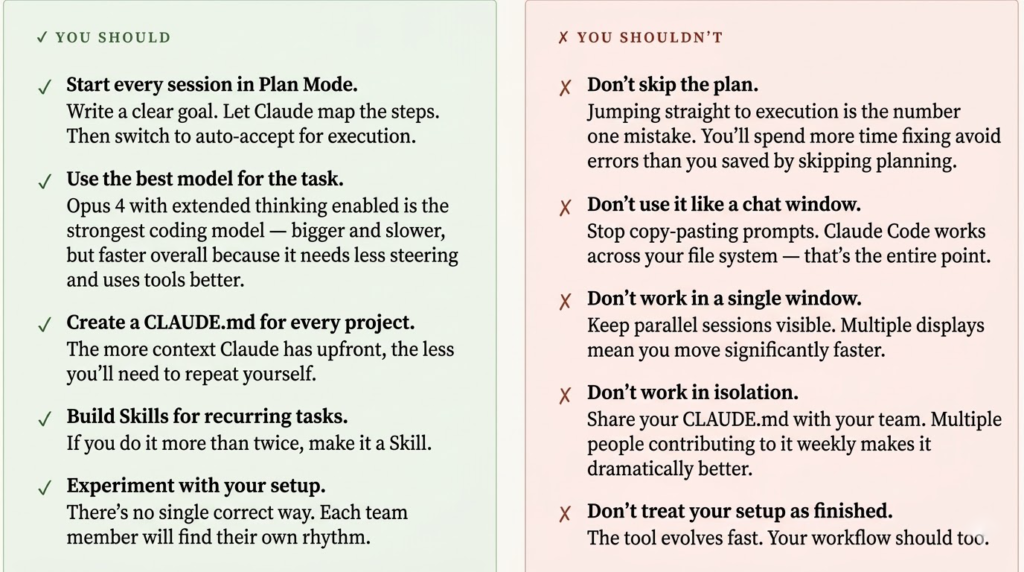
Here’s the number one mistake beginners make: they jump straight into prompting. They have an idea, they type it out, and they expect Claude Code to figure it out. Sometimes it works. Usually it produces something that needs significant revision, because the model had to guess at your intent rather than work from a clear brief.
The professionals do something different. They plan before they execute.
1- Start in Plan Mode
Hit Shift + Tab twice to enter plan mode. This tells Claude Code you want it to think and strategize, not build yet.
2- Write Your Goal Clearly
State the objective with as much precision as you can. The more specific the goal, the better the plan.
3- Let Claude Break It Into Steps
Claude Code will decompose your goal into a logical sequence of sub-tasks. Read them carefully.
4- Review and Iterate the Plan
This is your moment to push back, reorder, or add nuance. A five-minute conversation here saves a thirty-minute cleanup later.
5- Switch to Auto-Accept Mode
Once the plan is solid, flip to auto-accept edits and let Claude Code take over.
6- Claude Executes End-to-End
It works through the plan systematically, touching files, running commands, and verifying changes as it goes.
7- Review the Output
Check what was built. If something needs tweaking, you iterate, but you’re refining, not rebuilding from scratch.
The mental shift here is profound. You stop thinking of yourself as someone who writes prompts and starts thinking of yourself as someone who writes briefs. The better your brief, the less you’ll need to intervene. This is exactly the dynamic between a good manager and a talented team: clarity at the front means autonomy in the middle.
The Power Features Most Users Never Touch
Once you’ve internalized the planning workflow, the next frontier is the power features, the tools that take Claude Code from « really useful AI assistant » to « the best hire you’ve ever made. »
Model Context Protocol (MCP)
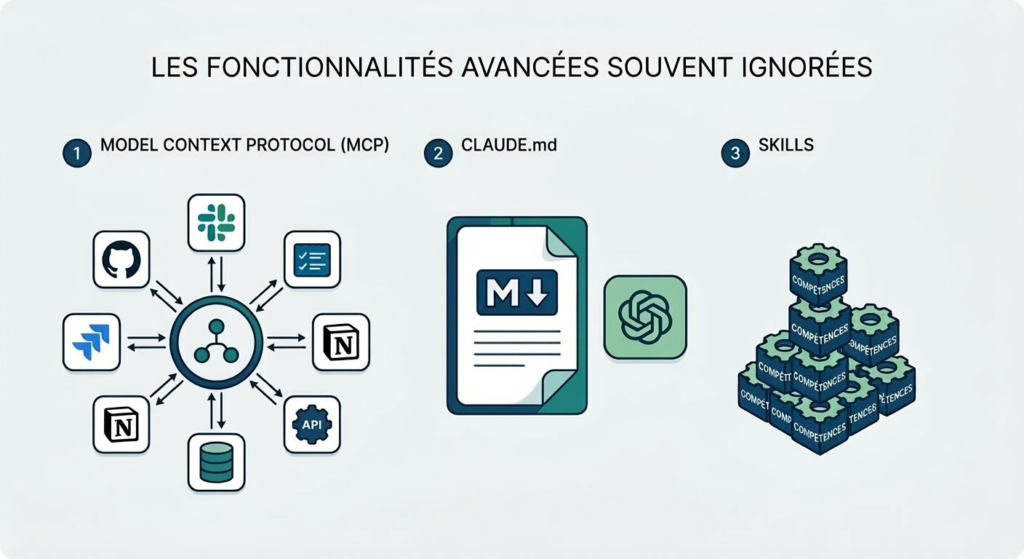
Think of MCP as USB-C for AI. In other words, it’s a single protocol that connects Claude Code to your entire tool stack, GitHub, Notion, Slack, Jira, databases, and custom APIs. As a result, one interface can support hundreds of integrations. Instead of switching between tools, Claude Code can read from and write to all of them in a single workflow.
For example, you could ask Claude Code to pull open issues from Jira, check the related code on GitHub, write the fixes, push a branch, and post a Slack update when it’s done. Importantly, this isn’t hypothetical. Rather, it’s exactly what MCP enables. Consequently, the tool becomes not just a coding assistant but a full workflow orchestrator.
CLAUDE.md (Project Memory)
A markdown file that gives Claude Code permanent memory: your conventions, key commands, style guides, and context it would otherwise ask you to repeat. Place it globally at ~/.claude/CLAUDE.md or per-project at /CLAUDE.md. If you keep explaining the same things, that information belongs here. Share it with your team and everyone’s sessions improve instantly.
Skills (Reusable Automations)
Skills are task-specific instruction packages that Claude Code automatically loads when they’re relevant. For instance, you can store them in ~/.claude/skills/ with a SKILL.md file for each skill. This lets you create reusable workflows for deployments, code reviews, documentation, or any repeated task.
As a rule of thumb, if you do something more than twice, turn it into a Skill. As a result, Claude Code evolves from a personal productivity tool into a powerful team-level force multiplier.
10 Digital Marketing Trends in 2026 Every Content Creator Must Know
AI-powered tools like Claude Code don’t exist in a vacuum, they’re reshaping the entire content creation and marketing landscape. If you’re a founder or creator using Claude Code to build faster, you’ll want to pair that technical edge with the marketing intelligence covered in this piece on 2026’s defining digital trends. Knowing where the market is heading is what lets you build the right things, faster.
How Founders Are Using This Right Now
Claude Code isn’t just a developer tool anymore. Founders with zero or minimal engineering backgrounds are using it to compress months of work into weeks. Here’s how the most effective ones are doing it:
Synthesising Customer Feedback
Drop in raw survey exports, interview transcripts, or support tickets. Get back a structured, categorised analysis with themes, severity, and patterns, in minutes.
Drafting Documents & Presentations
Hand Claude Code your rough notes and it generates full PRDs, pitch decks, or investor memos with proper structure and professional language.
Building Code & Prototypes
Create MVPs, internal dashboards, and automation scripts without a dev team on hand. You describe the product; Claude Code builds it.
Research & Competitive Analysis
Feed it industry reports, competitor websites, and market data. Ask for a synthesised brief. Come out of a lunch break more informed than most analysts.
Automating Repetitive Workflows
Recurring reports, batch file processing, data cleanup, changelog generation, anything you’ve been doing manually on a schedule.
Building & Evolving Skills
The most advanced users are building their own library of Skills that encode their company’s institutional knowledge, and sharing them across the team.
The Rules: What to Do and What to Avoid
This Is a Skill, Not a Shortcut
The people who get the most out of Claude Code aren’t the ones who type the cleverest prompts. They’re the ones who’ve taken the time to understand how the tool thinks, built the infrastructure around it, the CLAUDE.md files, the Skills library, the planning habit, and treated it like a genuine collaborator rather than a vending machine.
The ceiling for what you can accomplish with Claude Code is genuinely high. But like any powerful tool, it rewards those who learn to use it properly. Start with the workflow. Build the memory files. Create your first Skill. Then watch the gap between your ambitions and your output quietly close.
A good plan is everything. The better your brief, the fewer revisions you’ll need to make.
The era of solo founders, two-person product teams, and individual creators shipping at startup speed is here. Claude Code isn’t the future of work, it’s already how the best operators are working today.